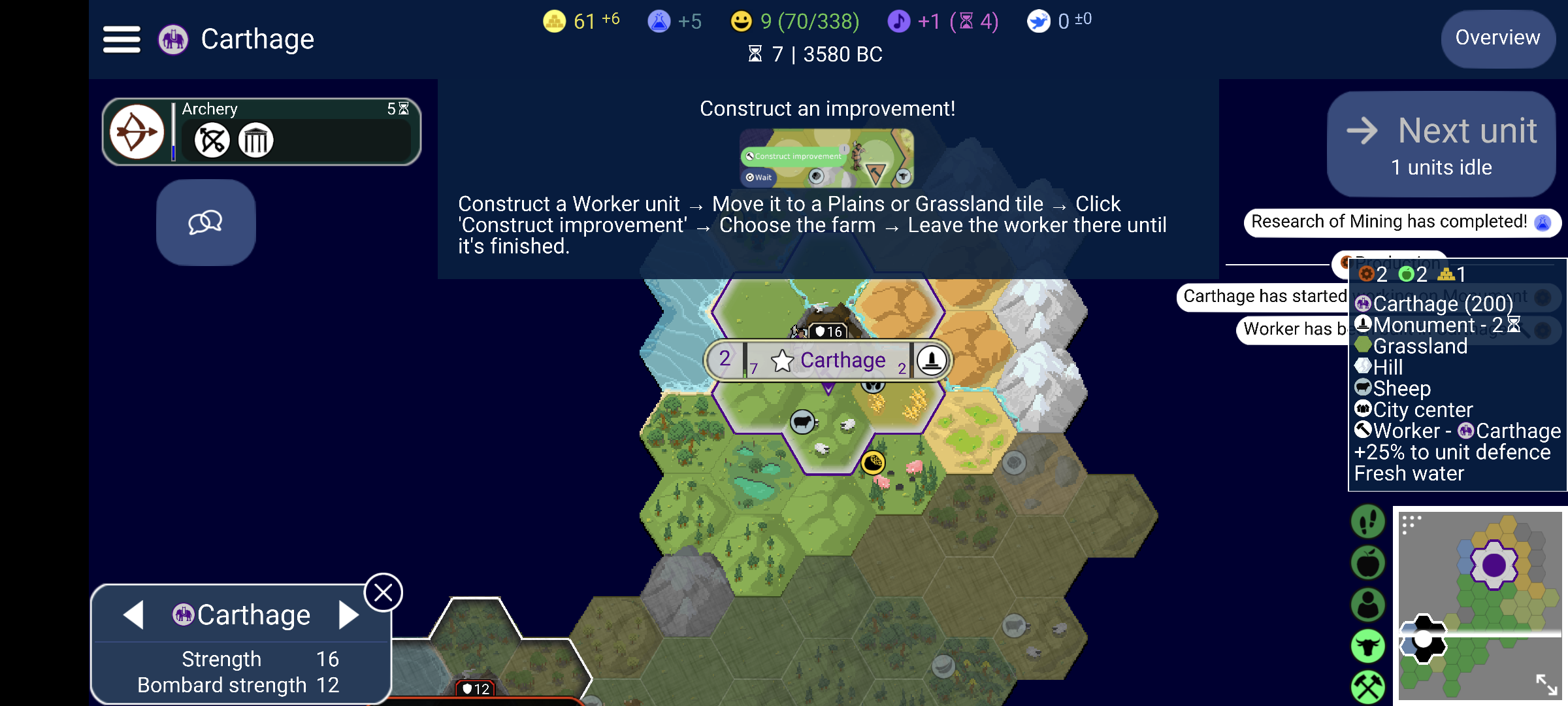
1 Top bar (left → right)
Your empire’s vital statistics. Every icon here is also a button.

- ☰ hamburger — the game menu: save/load, options, Civilopedia, exit.
- Elephant icon + “Carthage” — your civilization (the elephant is Carthage’s symbol). Tap it to open your nation’s Civilopedia page.
- 🪙 61 ⁺⁶ — gold: 61 in the treasury, +6 per turn. Tap → empire stats overview.
- 🧪 +5 — science: 5 science per turn. Tap → tech picker.
- 😊 9 (70/338) — happiness: 9 net happiness (green; turns red when negative). The parentheses are your Golden Age progress: 70 points stored of the 338 needed. Tap → resources overview.
- 🎵 +1 (⏳4) — culture: +1 per turn; a new social policy can be adopted in 4 turns. Tap → policy screen (once available).
- 🕊 0 ±0 — faith: 0 stored, 0 per turn. Used later to found a religion and buy religious units.
- ⏳ 7 | 3580 BC (second line) — current turn number and in-game year.
- Overview (top right) — opens the Empire Overview: cities, units, stats, diplomacy summary.
2 Research panel & Diplomacy button
The dark-green pill on the left is your current research; the speech-bubble square opens diplomacy.
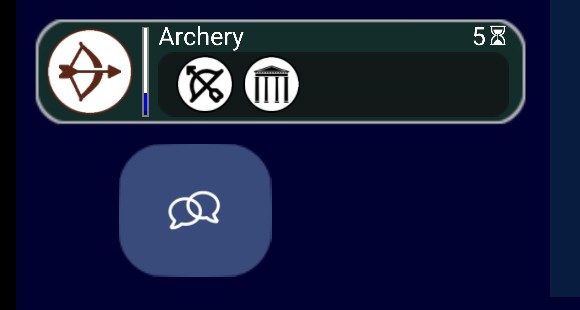
- Bow icon — the tech being researched: Archery.
- Thin vertical blue bar — research progress (dark blue = done so far, lighter blue = where it will be after this turn). You just started it.
- “5 ⏳” — 5 turns to finish at your current science rate.
- Two small round icons below the name — what Archery unlocks: the Archer unit (crossbow icon) and the Temple of Artemis wonder (columned temple). Up to five unlocks are shown here.
- Tapping the whole panel opens the tech tree.
- Blue speech-bubbles button — the Diplomacy screen. It appears because you have met another civilization.
3 Tutorial card
Unciv’s tutorial system telling you your current goal.

- “Construct an improvement!” — the tutorial’s current task for you.
- The little picture shows the Worker’s action buttons (Construct improvement and Wait).
- The text is the recipe: build a Worker → move it to Plains/Grassland → tap “Construct improvement” → choose the farm → leave the Worker until it’s finished.
4 Right side: Next unit, notifications & tile info
The game’s “to-do” button, the turn’s event log, and the inspector for the selected tile.
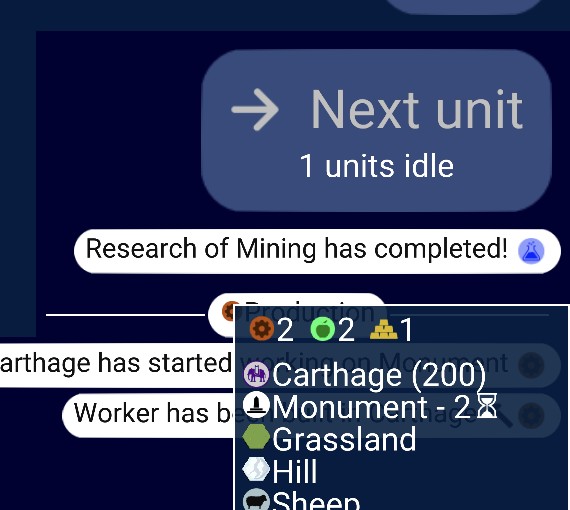
- → Next unit / “1 units idle” — jumps the camera to the next unit awaiting orders (your Worker). When nothing is idle it becomes Next turn.
- Notifications (white pills) — what happened this turn: “Research of Mining has completed!”, “Carthage has started working on Monument”, “Worker has been built in Carthage”. Tapping one opens the related screen.
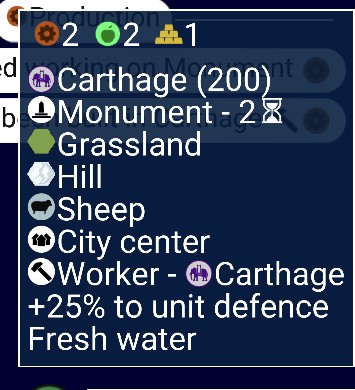
- ⚙2 🍏2 🪙1 — yields of the selected tile: 2 production, 2 food, 1 gold. Tap for a per-source breakdown.
- Carthage (200) — the city on this tile, with its hit points: 200 of 200 max — undamaged.
- Monument - 2⏳ — current construction, done in 2 turns.
- Grassland / Hill / Sheep / City center — base terrain, terrain feature, resource, and the “improvement” (the city itself).
- Worker – Carthage — your Worker is standing on this tile.
- +25% to unit defence — defensive bonus from the hill.
- Fresh water — the tile touches a river or lake (matters for farms later).
5 The city banner
The pill floating over your city — left to right:
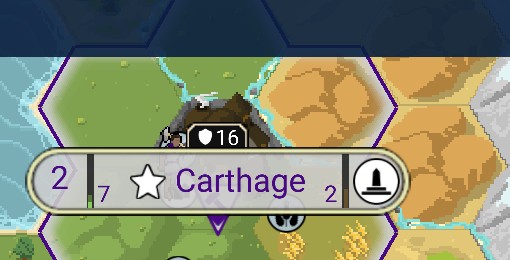
- 2 — population (2 citizens).
- thin green bar + green 7 — food stored toward the next citizen; the city grows in 7 turns.
- ★ — this is your capital.
- Carthage — the name in your civ’s color; the cream border means it’s your own city.
- 2 + monument icon — what’s being built (Monument) and turns remaining.
- dark badge, shield + 16, above the banner — the city’s defence strength (16). An attacker must beat this to capture the city.
- purple ▼ triangle under the banner — a “hidden unit” marker: a civilian unit (your Worker) is on the city tile, tucked behind the banner — you can see its sprite peeking out next to the shield badge. Tap the banner once and it swings down so you can reach the unit; tap again to open the city screen.
6 The red badge at the bottom edge
Easy to miss — there’s a rival city just off-screen.

- The red-bordered shield + 12 with the red line across the bottom of the screen is another civilization’s city, almost entirely off-screen to the south.
- The shield badge is that city’s defence strength (12) — same kind of badge as your own “16”.
- The red border means you are at war with its owner (your own badges and borders are cream/purple).
- Its territory shows on the map as the white-outlined hexes to the southwest — borders are drawn in each civ’s nation colors, and theirs is white/black.
7 Bottom-left city panel
The quick panel for the currently selected city.
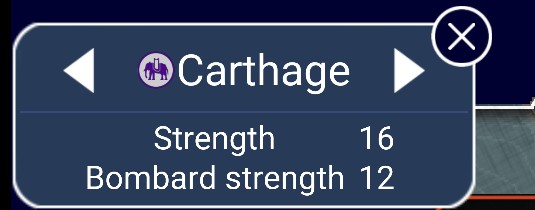
- ◀ Carthage ▶ — the arrows cycle through your cities (you only have one so far); X closes the panel.
- Strength 16 — how hard the city is to capture (matches the shield badge above the banner).
- Bombard strength 12 — the damage when the city itself bombards attackers; cities strike back at enemies in range.
8 The map itself
Terrain, borders, resources and fog around your capital.
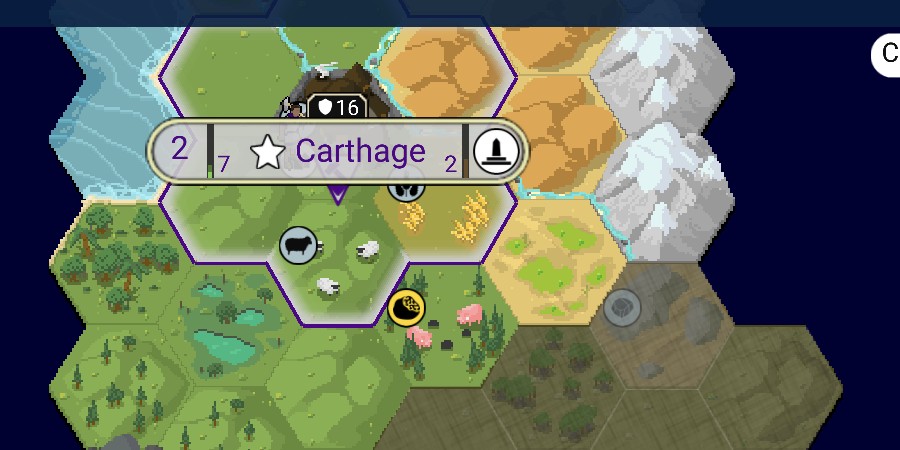
- Purple lines along hex edges — your cultural borders: Carthage’s territory.
- Cyan squiggly lines — rivers: fresh water, bonus gold, and a combat penalty when crossing to attack.
- Terrain — bright green = grassland, yellow-green = plains, orange = desert, white/grey peaks = mountains (impassable), trees = forest, turquoise ponds = lakes/oasis, light blue at the left edge = coast.
- Resource icons — sheep (grey circle, black sheep + woolly sprites), wheat (yellow sheaves on the plains east of the city), truffles (gold/black circle with the pink pigs), stone blocks north of the city. Greyed-out icons on dim tiles are resources you saw earlier but can’t currently see.
- Dim, desaturated tiles (right and bottom) = fog of war — explored before, but not in sight right now. The solid dark navy = never explored.
9 Minimap & the green overlay buttons
The world at a glance, plus five display toggles.
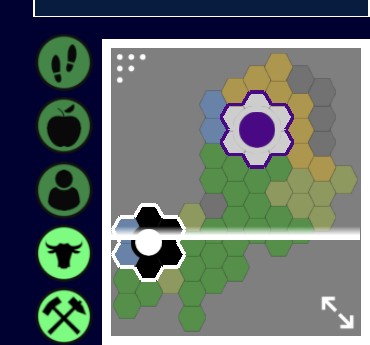
- Minimap colors — grey = unexplored, colored = explored terrain, the purple “flower” = your territory with city dot, white-outlined hexes = what’s currently on your screen, the black/white cluster = the rival civ’s territory and city.
- White dots (top-left of minimap) — drag handle to resize it.
- ↘↗ arrows (bottom-right) — maximize / minimize the minimap.
- Footsteps — unit-movement overlay: shows who moved or attacked last turn.
- Apple — show tile yields on every hex.
- Person — show which tiles your citizens are working.
- Bull head — show / hide resource icons.
- Crossed pickaxes — show / hide improvement icons.
★ In short
You’ve just finished Mining, Archery is next (5 turns), Carthage is building a Monument (2 turns) and grows in 7. Your Worker stands idle on the city, waiting for you to follow the tutorial and build a farm — and keep an eye on the south: there’s a hostile city (strength 12) just off-screen, and you’re already at war with its owner.